
InstaVision: Smart & Safe Home
InstaVision Inc.House & Home
4.51.28K Reviews
- Version
- 2026.11.04.1955
- Installs
- 100.00K
- Age Rating
- Everyone
Screenshots

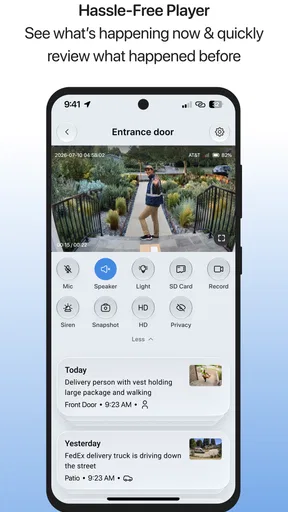
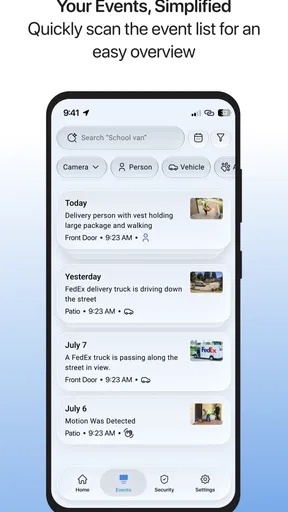
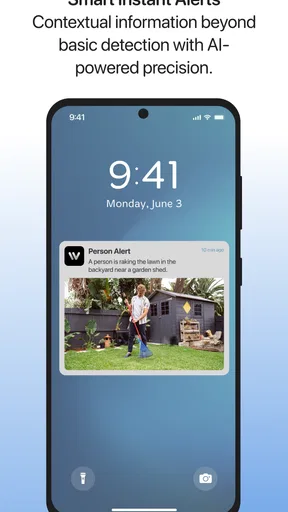
Our Review of InstaVision: Smart & Safe Home
 Analysis by Appyee
When I look at a home-monitoring app, I want a clear answer to one question: will it help me notice what matters without turning everyday security into another chore? InstaVision: Smart & Safe Home makes a good case for itself because it brings live HD video, two-way audio, and event detection into one free House & Home app. I found it most useful as a practical way to check in on a room, a doorway, a pet, or a family member from a phone rather than as a complete replacement for every dedicated security product.
That distinction matters. A camera app can be excellent for quick awareness while still being the wrong choice for someone who needs a large professionally installed system, highly specialized sensors, or a very specific smart-home ecosystem. My experience with InstaVision is that its appeal comes from keeping the main monitoring actions close together: viewing, listening, speaking, and responding when an event deserves attention.
What I would consider before choosing it
The first decision is whether you need simple home awareness or a broader security setup. If your concern is checking whether something is happening at home, seeing what triggered an alert, and speaking through the camera, InstaVision covers the core experience in a straightforward way. The HD video is especially helpful when I am trying to identify what is actually in view instead of relying on a vague movement notification.
The second decision is how much you value immediate interaction. Many people think of monitoring as watching a feed, but two-way audio changes the practical use. I can use the app to communicate rather than merely observe. That may be useful for telling someone I will be home soon, checking on a pet, or asking a visitor to wait. It is a small feature in the description, but in daily use it can save the extra step of calling another person or walking to the room.
The third question is how you respond to event detection. I see this function as a filter, not as a substitute for judgment. An event notification can draw my attention to a moment worth checking, but I still need to look at the video and decide what it means. That is a healthier expectation than treating every alert as proof of danger. The value is in reducing the need to stare continuously at a live view.
Device compatibility is also part of the decision. The app supports Android devices running version 9 or later, which makes it approachable for people who are not using the newest phone. The current version is 2026.08.12.1510, so I would still keep the app updated and make sure the phone itself runs a supported system before planning a monitoring setup around it.
InstaVision is free to install, and it is rated for Everyone. That makes it easy to try without making a purchase decision first. Still, “free” should not be confused with “effortless.” A useful home-monitoring experience depends on where the camera is placed, whether the view is actually useful, and whether the people using the account understand how alerts and audio will be handled.
How I would set it up for a real household routine
I would begin with one camera position and one clear purpose instead of trying to cover the entire home immediately. For example, I might choose the main entry area because it answers a specific question: did someone arrive, and do I need to respond? Another household might get more value from a living room view for checking on a pet during the day. Starting with a defined purpose makes it easier to judge whether event detection is helping or simply creating noise.
Placement deserves more attention than people usually give it. HD video cannot rescue an obstructed or poorly angled view. I would avoid pointing the camera at a bright window, placing it where people constantly pass directly beneath it, or positioning it so that the microphone is too far from the area where conversation normally happens. Two-way audio is only useful when both sides can hear and be heard clearly.
I would also decide in advance who should respond to an event. If several people receive every notification, a minor movement can become a group discussion. A better routine is to assign the first check to one person, with another household member available when needed. This is one of the less obvious advantages of thinking about the workflow before relying on the app: the technology may detect an event, but the household still needs a sensible response plan.
Where InstaVision feels strongest
The strongest part of the experience is the combination of functions. Live HD video gives me context, event detection helps bring attention to a moment, and two-way audio lets me act without leaving the screen. These tools are more useful together than they would be separately. A notification without a view leaves me guessing, while a video feed without event awareness requires more constant checking.
I also like the balance between reassurance and convenience. Imagine leaving home while a delivery is expected. Instead of repeatedly opening a live feed, I can rely on an event prompt to tell me when something deserves a look. If I see a person at the door, two-way audio gives me a way to communicate immediately. That does not guarantee that every situation will be identified perfectly, but it creates a practical chain from awareness to response.
Another good use is checking on a pet during a normal workday. I would not treat the app as a replacement for responsible care, but a quick view can answer whether the pet is resting, moving around, or near a place it should avoid. If something unusual appears, speaking through the camera may interrupt the behavior or reassure the animal with a familiar voice. The important trade-off is that audio interaction works best when the person on the other end, or the pet, is likely to respond to it.
For families, the app can also serve as a quick visual check rather than a constant surveillance tool. I might use it to see whether a child has arrived in a shared space or whether an older relative is where expected, then use audio to ask if everything is fine. That kind of use requires respect for privacy and household agreement. The app makes communication possible, but it does not decide when monitoring is appropriate.
The public response suggests that many people find the overall idea useful. InstaVision has a 4.5 average from around 8.2 thousand ratings, with roughly 1.1 thousand written reviews and over 100 thousand installs. I treat those figures as signs of real interest rather than a guarantee that every phone, camera position, or household routine will feel identical to mine.
Small habits that make the app more useful
My first practical tip is to test event detection during ordinary activity before depending on it while away. Walk through the monitored area at different times, note which movements produce useful prompts, and observe whether normal household traffic makes the alerts too frequent. This gives me a better understanding of what the app is actually helping me notice.
My second tip is to separate “check now” situations from “review later” situations in my own routine. Not every event deserves an immediate response. If I open the app every time I see a prompt, the notifications can become tiring. I would reserve instant attention for the entryway or another sensitive area, while treating less important activity as something to inspect when convenient.
My third tip is to use two-way audio deliberately rather than leaving it as a novelty. A short, calm message is more useful than repeatedly speaking through the camera. I would also remember that sound travels both ways: conversations near the camera may be audible to the person viewing it, so I would avoid placing it in a room where private discussions happen casually.
A fourth useful habit is to review the camera’s purpose whenever the household changes. Furniture moves, pets develop new routines, and children become more independent. A view that was useful last month may now point at the wrong area or generate unnecessary events. The app can remain the same while the best setup changes around it.
Where another kind of solution may fit better
InstaVision may not be the best match for someone who wants a full security installation with many different device types. If your priority is a broad system built around door sensors, alarms, locks, or professional monitoring, a dedicated security platform may offer a more suitable structure. I would choose that route when the household needs coordinated protection beyond video and communication.
It may also be less appealing to people who already live inside a different smart-home ecosystem and want every camera, speaker, display, and automation to work through one familiar control center. In that situation, the convenience of staying with an established system can outweigh the appeal of trying a separate monitoring app. I would not switch simply because InstaVision has a clean set of core camera functions.
On the other hand, someone who only wants a basic live view may not need event detection or two-way audio. A simpler camera application could be enough if the main task is checking a room occasionally. InstaVision makes more sense when I expect to move from viewing to responding, not when I want the smallest possible feature set.
There is also a privacy and household-comfort question. Some people are comfortable with a camera in a shared area but dislike audio monitoring or alerts that draw attention to normal movement. Others may find that constant notifications create anxiety rather than reassurance. If the presence of a monitoring device would make everyone at home feel watched, a different arrangement—or a more limited camera placement—would be the better decision.
I would be cautious about using any camera app as the sole answer for urgent emergencies. A phone-based view can help me understand a situation, but it is not the same as a dedicated alarm response service. For high-risk properties or people who need guaranteed assistance, I would look beyond a free camera app and consider a more comprehensive plan.
What switching to it really involves
The financial barrier is low because the app is free, but the real cost of switching is time and routine. I would need to choose a sensible camera position, learn how event prompts behave, explain audio use to other household members, and decide who checks alerts. Those steps are not difficult, but skipping them can make a capable app feel unreliable.
There is also a habit cost when moving away from another monitoring tool. If I already know where to find live video, how alerts are presented, and how my family responds, a new interface has to earn its place. InstaVision’s advantage is that its main purpose is easy to understand, but I would still test it alongside the existing routine before removing a system that people depend on.
For a household starting from nothing, the transition is simpler. I can define one monitored area, establish a notification routine, and decide whether two-way audio adds real value. If it does, the app can become a convenient daily checkpoint. If it does not, I have learned that a simpler alternative may suit us better without having invested in a complicated setup.
I would also think about phone access. A monitoring app is most useful when the people responsible for checking it can reach it comfortably and know what action to take. If the only person who understands the setup is frequently unavailable, the household may need a shared process rather than relying on one person’s phone habits.
My recommendation for different types of users
I recommend InstaVision to renters, families, pet owners, and anyone who wants an accessible way to combine HD home video, event awareness, and two-way communication. It is particularly appealing when the goal is practical reassurance rather than a large, professionally managed security network. The free entry point makes experimentation sensible, and the Everyone age rating keeps it approachable for ordinary household use.
I would recommend it less strongly to people who need advanced security infrastructure, a single tightly integrated smart-home platform, or a guaranteed emergency response. Those users should compare dedicated alternatives before treating this app as the foundation of their security plan. The fact that it is easy to try does not remove the need to match the tool to the level of protection required.
For me, the deciding strength is the way the app links an event to a useful response. I do not just want to know that something happened; I want enough visual context to judge it and a way to speak when speaking is appropriate. That workflow makes InstaVision more useful than a passive camera viewer, while still keeping it simpler than a full security ecosystem.
InstaVision: Smart & Safe Home is developed by InstaVision Inc. and was released on March 12, 2024. Its current version is 2026.08.12.1510, and it has already attracted more than 100 thousand installs. Those details tell me it is an established app rather than an idea with no real audience, but my recommendation still rests on how well its tools fit a household’s daily behavior.
My bottom line: I would try InstaVision when I wanted a free, focused way to check a home area, receive event prompts, and communicate through the camera. I would start small, test the alert routine, and be honest about whether the notifications reduce effort or add stress. If that trial produces useful awareness without disrupting privacy or daily life, the app earns its place. If the household needs a wider security system, I would keep looking rather than asking this focused tool to do a job it was not designed to handle.
Privacy and Permissions
See what permissions an app requests and how it handles your data.
- Location
- approximate location (network-based), precise location (GPS and network-based)
- Phone
- write call log
- Photos/Media/Files
- read the contents of your USB storage, modify or delete the contents of your USB storage
- Storage
- read the contents of your USB storage, modify or delete the contents of your USB storage
- Camera
- take pictures and videos
- Microphone
- record audio
- Wi-Fi connection information
- view Wi-Fi connections
- Other
- view network connections, pair with Bluetooth devices, access Bluetooth settings, change network connectivity, connect and disconnect from Wi-Fi, full network access, run at startup, control vibration, prevent device from sleeping, modify system settings, Google Play license check, read Google service configuration
Verdict
Strengths of InstaVision: Smart & Safe Home
- Live video streaming helps monitor your home from almost anywhere.
- Motion alerts can notify you quickly when activity is detected.
- Two-way audio supports convenient communication with people at home.
- Remote access makes it easy to check cameras while traveling.
- A simple interface helps new users manage connected cameras easily.
Limitations of InstaVision: Smart & Safe Home
- Reliable Wi-Fi is required for smooth video and timely alerts.
- Cloud features may require a subscription or involve extra costs.
- Continuous camera use can increase battery and data consumption.
- Privacy depends on securing your account and connected devices.
- Older phones may experience slower performance with live video.
Similar Picks in This Category
View All
Universal TV Remote Control
CodeMatics Media Solutions3.9

AlfredCamera Home Security app
Alfred Systems Inc.4.7

Planner 5D: AI Home Design
Planner 5D4.5

Universal Tv Remote-Cast to TV
One Music Player4.1

Zillow: Homes for Sale & Rent
Zillow Group4.8

99acres Buy/Rent/Sell Property
infoedge.com4.3
Frequently Asked Questions
What is InstaVision: Smart & Safe Home used for?
InstaVision: Smart & Safe Home is designed to help users monitor and manage compatible home security devices from a mobile phone. Depending on the supported hardware, the app may let you view live camera feeds, review recordings, receive motion or activity alerts, and control connected devices remotely. Its usefulness depends heavily on device compatibility, account setup, and a stable internet connection.
Is InstaVision: Smart & Safe Home compatible with every security camera?
No. InstaVision: Smart & Safe Home is generally intended for specific compatible cameras or smart-home products rather than every security device on the market. Before downloading, check the app listing, manufacturer documentation, or your device’s packaging for supported models. Some features may also vary by camera generation, region, firmware version, subscription plan, or whether the device is connected through Wi-Fi or another network.
Does InstaVision: Smart & Safe Home require an account or internet connection?
The app may require users to create or sign in to an account before adding cameras and accessing remote features. Internet access is normally necessary for viewing live video, receiving notifications while away from home, synchronizing recordings, and managing devices remotely. Performance can be affected by weak Wi-Fi, slow upload speeds, router settings, or temporary cloud-service outages, so it should not be treated as a replacement for a dedicated alarm system.
Is InstaVision: Smart & Safe Home safe and private to use?
Because a home-monitoring app can handle video, audio, device information, and account data, privacy depends on both the application and the way it is configured. Use a strong, unique password, enable available two-factor authentication, keep the app and camera firmware updated, and limit account access to trusted people. Review permissions and privacy policies carefully, especially if cameras record indoor spaces or capture other household members.
Are all InstaVision: Smart & Safe Home features free?
The basic app download may be free, but certain functions can depend on the connected hardware or optional services. Cloud recording, extended video history, advanced alerts, additional users, storage capacity, or premium monitoring features may require a subscription or in-app purchase. Check the current store description and pricing before relying on a particular feature, since plans, trial periods, and availability can change over time.
